Uncut Support Gem
Rewards
Receive the selected quantity of PoE 2 Uncut Support Gems at level I, II, III, IV, or V through a direct in-game trade. Choose the destination league and mode, select the gem level your build needs, and order from 1 to 50 items.
- Exact item level: every delivered item matches the selected Uncut Support Gem I–V option.
- Exact quantity: the trade covers the number of gems selected on the page.
- Direct delivery: stock, character name, realm, and meeting point are confirmed before transfer.
- Engraving choice stays yours: each uncut item remains unengraved so you can choose an eligible Support Gem in your own gemcutting menu.
| Selected item | Guaranteed outcome | Check before engraving |
|---|---|---|
| Uncut Support Gem I–V | The selected level and quantity delivered unengraved. | The target support must be available at that uncut gem level and compatible with the active skill. |
| Direct trade | Delivery on the confirmed league and mode. | Characters and items are not interchangeable across every league or Softcore/Hardcore economy. |
| Engraving result | You choose one eligible regular Support Gem per uncut item. | Lineage Support Gems cannot be created from an Uncut Support Gem. |
The guaranteed service outcome is delivery of the selected unengraved items. Build damage, skill behavior, later resale value, and the usefulness of the support you choose depend on your skill tags, current setup, patch state, and league economy.
Description
PoE 2 Uncut Support Gem
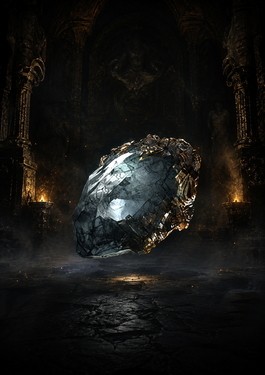
An Uncut Support Gem is the item used to engrave a regular Support Gem in Path of Exile 2. Instead of receiving a preselected support, you keep the engraving choice: open the gemcutting interface, choose an eligible support from the level available to that item, and create the option that fits your active skill.
This page is for direct item delivery, not gem farming. Choose Uncut Support Gem I, II, III, IV, or V, select Runes of Aldur or Standard with Softcore or Hardcore, and set a quantity from 1 to 50. CarrySquad confirms stock before arranging the in-game trade.
Choose the Correct Uncut Support Gem Level
| Option | What it controls | Best ordering check |
|---|---|---|
| Level I–II | Access to the earlier groups of regular Support Gems. | Use the in-game gemcutting menu or your current build guide to confirm the named support appears at the chosen level. |
| Level III–IV | Access to later support groups used as campaign and endgame setups develop. | Confirm skill tags and any added cost, reservation, cooldown, or damage trade-off. |
| Level V | Access to the highest regular Support Gem tier available from this item family. | Do not order it for a Lineage support; Lineage Support Gems use separate acquisition sources. |
A higher uncut level does not automatically make every build stronger. The important match is the exact support you want to engrave and whether that support can modify your active skill. Check the support's tags and restrictions before consuming the item.
How Engraving Works
Right-click the Uncut Support Gem to open the engraving interface, then choose an eligible regular Support Gem. The uncut item is consumed and the selected support is created. Support Gems modify active skills with effects such as extra damage behavior, projectiles, ailments, area changes, utility, resource costs, or conditional bonuses, but every support has compatibility rules.
Uncut Support Gems can drop throughout the game, with the available item level tied to area progression. They are also tradable; official version 0.3.0 enabled Uncut Skill, Support, and Reservation Gems on the Currency Exchange. This delivery service is useful when natural drops or exchange availability do not provide the level and quantity your setup needs.
Regular Supports and Lineage Supports Are Different
An Uncut Support Gem creates a regular Support Gem. It cannot engrave a Lineage Support Gem. Lineage supports are rare, named items with separate world-drop or encounter sources and should be ordered through the dedicated PoE 2 Lineage Support Gems page when you need a specific named support.
Uncut Skill Gems and Uncut Spirit Gems are also different item classes. Skill Gems create or upgrade active skills, while Spirit Gems cover persistent buff skills. Use this product only when the gemcutting menu or build plan specifically calls for an Uncut Support Gem.
League, Mode, Quantity, and Delivery
Select the exact destination economy before ordering. Runes of Aldur and Standard are separate choices, and Hardcore stock is confirmed independently from Softcore. The quantity applies to the selected Uncut Support Gem level; one unit means one unengraved item.
Delivery is completed through an in-game trade. Provide the correct character name, join the agreed party or meeting point, and keep enough inventory space for the order. For multiple support levels in one request, place separate selections or contact support before checkout so stock and the item breakdown can be confirmed.
For active and persistent skill items, browse the main PoE 2 items section. For boss help, currency, leveling, and other services, return to Path of Exile 2 services.
PoE 2 Uncut Support Gem FAQ
Can I choose the Support Gem after delivery?
Yes. The delivered item is unengraved. You choose an eligible regular Support Gem in your own gemcutting interface.
Does Uncut Support Gem V create a Lineage Support Gem?
No. Lineage Support Gems have separate acquisition sources and cannot be engraved from an Uncut Support Gem.
Can I order several gems?
Yes. Select a quantity from 1 to 50 for one chosen level. Confirm stock first for large or Hardcore orders.
Is the support automatically compatible with my skill?
No. Compatibility depends on the active skill and the chosen support's tags and restrictions. Check the in-game gemcutting menu or current build plan before engraving.
How does the service work
CarrySquad’s services are designed to help players efficiently complete in-game feats, earn rewards, and progress faster without the grind. Once you place an order, you receive access to a personal Service Dashboard and a notification link via email.
A specialized coach is quickly assigned to your order and communicates directly with you through the dashboard chat. Your coach will play alongside you in your squad, helping you achieve your requested objectives while sharing professional tactics and insights. All sessions are completed 100% by hand, without any bots or cheats, and progress updates are provided in real time.
Key steps in the CarrySquad service workflow:
-
Coach Matching: After ordering, you’re matched with a professional coach who joins your Dashboard chat to coordinate the session.
-
Joint Execution: Your coach assists you in reaching your goals—whether it’s completing difficult feats, unlocking exclusive rewards, or reaching character, account, or activity progression goals through collaborative play.
-
Flexible Scheduling: The coach coordinates with your preferred playing schedule to ensure sessions happen when it’s most convenient for you.
-
Instant Notification: You’re notified immediately upon reaching your objectives through both the Dashboard and email.
-
Maximum Security: Your account remains entirely in your hands. Our service is focused on safe, professional guidance, and customer support is always available for any questions.
CarrySquad services are tailored for efficient, safe, and hands-on progress—helping players clear difficult feats, earn exclusive items, and enhance their in-game reputation with professional coaching tailored to the objective you selected.
Requirements
- Access to Path of Exile 2 on the selected league and mode.
- A character that can join the supplier's party and complete an in-game item trade.
- Enough free inventory space for the selected quantity; larger orders may require more than one trade window.
- Check the intended active skill, Support Gem tags, attribute requirements, cost or reservation changes, and the required Uncut Support Gem level before ordering.
- Stay available in the CarrySquad service chat so stock, realm, character name, meeting point, and trade sequence can be confirmed.
If you have questions
Feel free to ask any questions in our chat. We are glad to help you, and our Squad will always find you the best service and the deadliest gun for your Guardian!